Brat Generator Make a Custom Album Cover
Turn a name, a lyric of your own or an inside joke into a square album cover.
Find your cover style
The classic Brat look pairs lowercase lettering with a vivid green background and a soft blur. Start with a word you would put on a playlist cover. Then try the same word in each style. Even a short name changes character when you shift the ink or flip the letters.
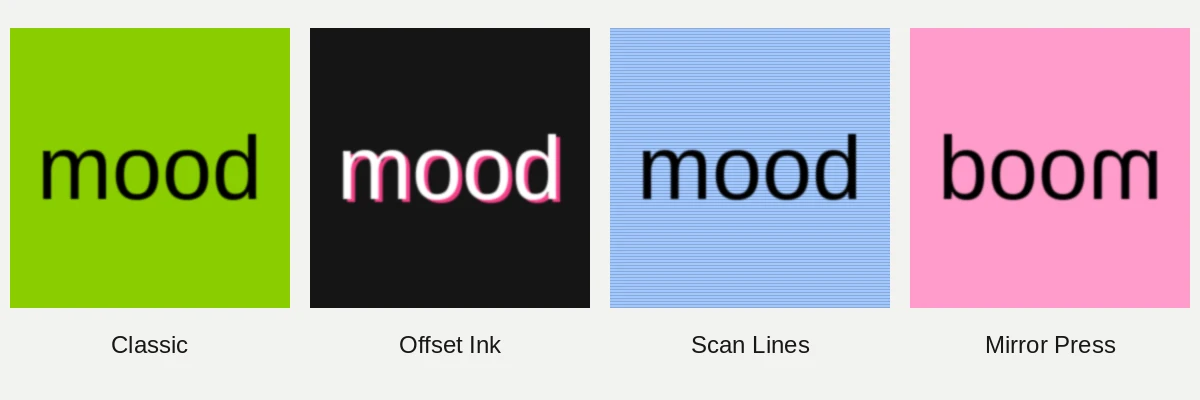
Which variation fits your text?
Classic keeps the letters centered. A single lowercase word and a little blur capture the familiar album cover look. Offset Ink adds a pink second impression behind the letters. Try black as the background so the white type and pink edge both stand out.
Scan Lines lays fine horizontal stripes across the whole image. Pair it with sky blue for a screen texture. Mirror Press reverses the lettering across the canvas. Try your initials first to see which letters change shape.
How to make a Brat cover
- Type a name or phrase in Cover text. Press Enter where you want a new line.
- Choose a style and background color. Adjust Text size until the phrase fills the square, then add Blur to taste.
- Select Download PNG to save your cover at 1080 × 1080 pixels. Use the same square for a playlist, a profile post or a personal mood board.
Common questions
How do I keep a long caption readable?
Break the caption where you would naturally pause and reduce the blur. The generator wraps long lines and reduces the lettering size when the text needs more room.
Will my cover include a watermark?
The PNG contains your cover design. The editor controls and studio logo stay outside the image.
Where does my text go?
Your browser draws the cover on your device. Download the PNG before refreshing the page if you want to keep it.